Documentation
Get up and running
in minutes.
Everything you need to install, connect your MCP client, and deploy your first topology. No prior MCP experience required.
Prerequisites
Required runtime. Check with python --version
Python package manager for installation
To clone the repository
Plus the MCP Control Center extension — only for live deploy, not for planning or generation
Installation
- 1
Clone the repository
git clone https://github.com/Mats2208/MCP-Packet-Tracer.git
cd MCP-Packet-Tracer
- 2
Install in editable mode
pip install -e .
Dependencies (
mcp[cli]>=1.13,pydantic>=2.11) install automatically. Thepacket_tracer_mcpmodule is then importable from any directory. - 3
Connect your MCP client
claude mcp add --scope user --transport stdio packet-tracer -- python -m packet_tracer_mcp --stdio
Claude Code shown. For VS Code / Copilot or any other client, see Connect a Client below.
Run the Server
claude mcp add (or any stdio client config), the client spawns
python -m packet_tracer_mcp --stdio for you. The internal HTTP bridge to Packet Tracer
(:54321) still starts automatically inside that process, so live deploy works the same. Want one shared instance for multiple clients? Run it yourself in streamable-HTTP mode:
$ python -m packet_tracer_mcp
INFO  Packet Tracer MCP v0.8.0
INFO  Transport: streamable-http
INFO  Listening on http://127.0.0.1:39000/mcp
Then point any client at http://127.0.0.1:39000/mcp.
Connect a Client
VS Code (Copilot)
Add to .vscode/mcp.json:
{
  "servers": {
    "packet-tracer": {
      "type": "stdio",
      "command": "python",
      "args": ["-m", "packet_tracer_mcp", "--stdio"]
    }
  }
}
Claude Desktop / generic
Add to claude_desktop_config.json:
{
  "mcpServers": {
    "packet-tracer": {
      "command": "python",
      "args": ["-m", "packet_tracer_mcp", "--stdio"]
    }
  }
} python -m packet_tracer_mcp --stdio) — recommended for desktop clients —
or point an HTTP client at http://127.0.0.1:39000/mcp. The server exposes 61 tools and its resources that any
MCP-compatible client can discover automatically. On Windows, if your client can't spawn the server, use the full path to python.exe in the command field.
Your First Topology
Once connected, ask your AI agent to build a topology. You can also call tools directly:
Quick Build (one-shot)
pt_full_build(
  routers=2,
  pcs_per_lan=2,
  dhcp=True,
  routing="ospf",
  has_wan=True
)

# Returns: plan + script + configs + explanation
Step by Step
# 1. Generate plan
plan = pt_plan_topology(routers=2, pcs_per_lan=2, routing="static")

# 2. Validate
pt_validate_plan(plan)

# 3. Auto-fix if needed
pt_fix_plan(plan)

# 4. Generate artifacts
pt_generate_script(plan)    # topology build script (JS)
pt_generate_configs(plan)   # IOS CLI configs

# 5. Get explanation
pt_explain_plan(plan)       # Natural language summary
Export to Files
# Save everything to a directory
pt_export(plan, path="./my_lab/")
Live Deploy Setup
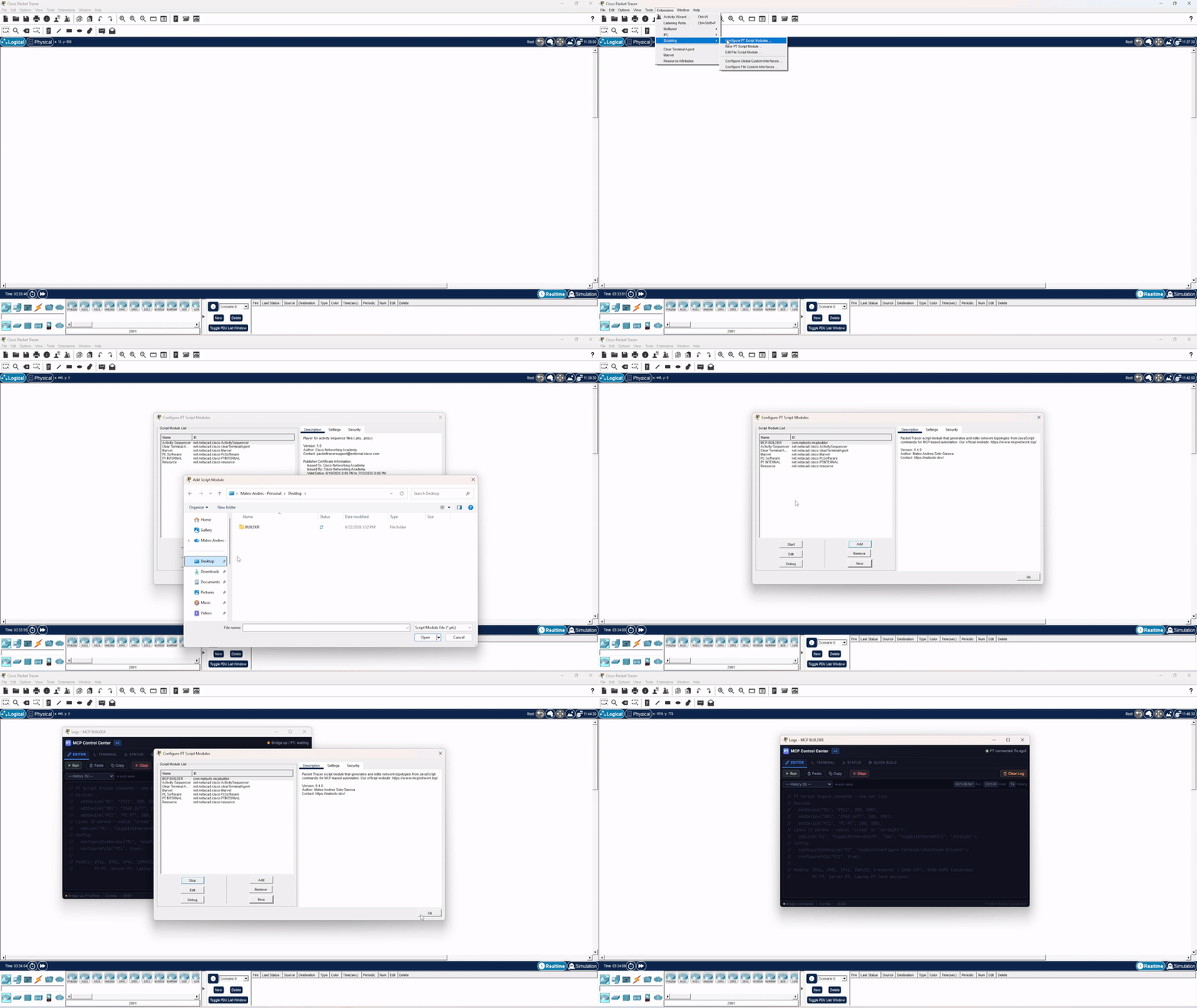
.pts script module from Releases).
Live deploy streams commands into a running PT via a bidirectional HTTP bridge — no copy-paste, no bootstrap snippet. - 1
Install the MCP Control Center extension (one-time)
Download the latest
.pts(e.g.V4.0.pts) from Releases, then in Packet Tracer:Extensions → Scripting → Configure PT Script Modules → Add… → select the .pts
This installs our own extension — you do not need any third-party tool.
- 2
Open the extension
Open
Extensions → MCP BUILDER. The MCP Control Center window appears and auto-connects to the bridge — its polling loop is built in, so there's nothing to paste. - 3
Deploy from the MCP server
# Check the bridge — should report ACTIVE and CONNECTED
pt_bridge_status()

# Deploy a plan in real-time
pt_live_deploy(plan)
Devices, links, and configurations appear in Packet Tracer within seconds. Full steps in the Live Deploy docs ↗.
Project Management
Save and load topologies for later reuse.
# List saved projects
pt_list_projects()

# Load a previously saved project
pt_load_project("my_lab")

# Export creates a project automatically
pt_export(plan, path="./my_lab/")
Troubleshooting
Server won't start
Check Python version: python --version (needs 3.11+). Ensure all dependencies installed: pip install -e .
Client can't spawn the server
For stdio clients, make sure python is on your PATH — on Windows, use the full path to python.exe in the command field. For HTTP mode, verify the server is reachable on http://127.0.0.1:39000/mcp.
No "Extensions → MCP BUILDER" / bridge not connected
The MCP Control Center extension isn't registered. Re-add the .pts via Extensions → Scripting → Configure PT Script Modules → Add…, then open Extensions → MCP BUILDER — it auto-connects (no snippet to paste). Make sure port 54321 is free.
Packet Tracer feels slow during live deploy
Minimize the MCP Control Center window (don't just push it behind PT). When the webview is visible but in the background, Chromium keeps rendering and competes for the GPU.
Validation errors
Run pt_fix_plan(plan) to auto-correct common issues (wrong cables, model limitations, port conflicts). If errors persist, check the error codes for specific guidance.
Supported features
Routing covers static, OSPF, EIGRP and RIP (static and OSPF are the most mature). NAT (static/dynamic/PAT) and ACLs (standard/extended/named) can be applied on live routers via the bridge. VLAN and STP automation aren't in the planner yet.
Need more details?
The full documentation — tool reference, device catalog, and networking guides — lives on the docs site.